
Allow complaints and bug reports to be recorded
Let the bot record complaints and bugs, or refer bugs to your own ticketing system, with an email per report or a daily summary.
The bot can record complaints and bug reports. It first provides what your site or documentation says about the issue. If that doesn’t work, it records the report and you receive it neatly.
Setting up
- Open your bot and select Answers & Reactions > Complaints and bugs.
- Under Complaints, enable the Allow complaints to be recorded option.
- For Report, choose Email per complaint or Daily summary. Enter an email address under To. If left blank, the support address is used.
- Under Bug reports, select one of the three options:
- Off: the bot treats a bug report as a regular question.
- Record in Chat on Page: the bot asks for the necessary details and records the bug. Here, also choose Email per bug or Daily summary.
- Refer to our own ticketing system: under Where should the customer submit a bug ticket?, enter the link to your bug tracker or support form. The bot will refer to it, also as a button, and will not record anything itself.
- Click save.
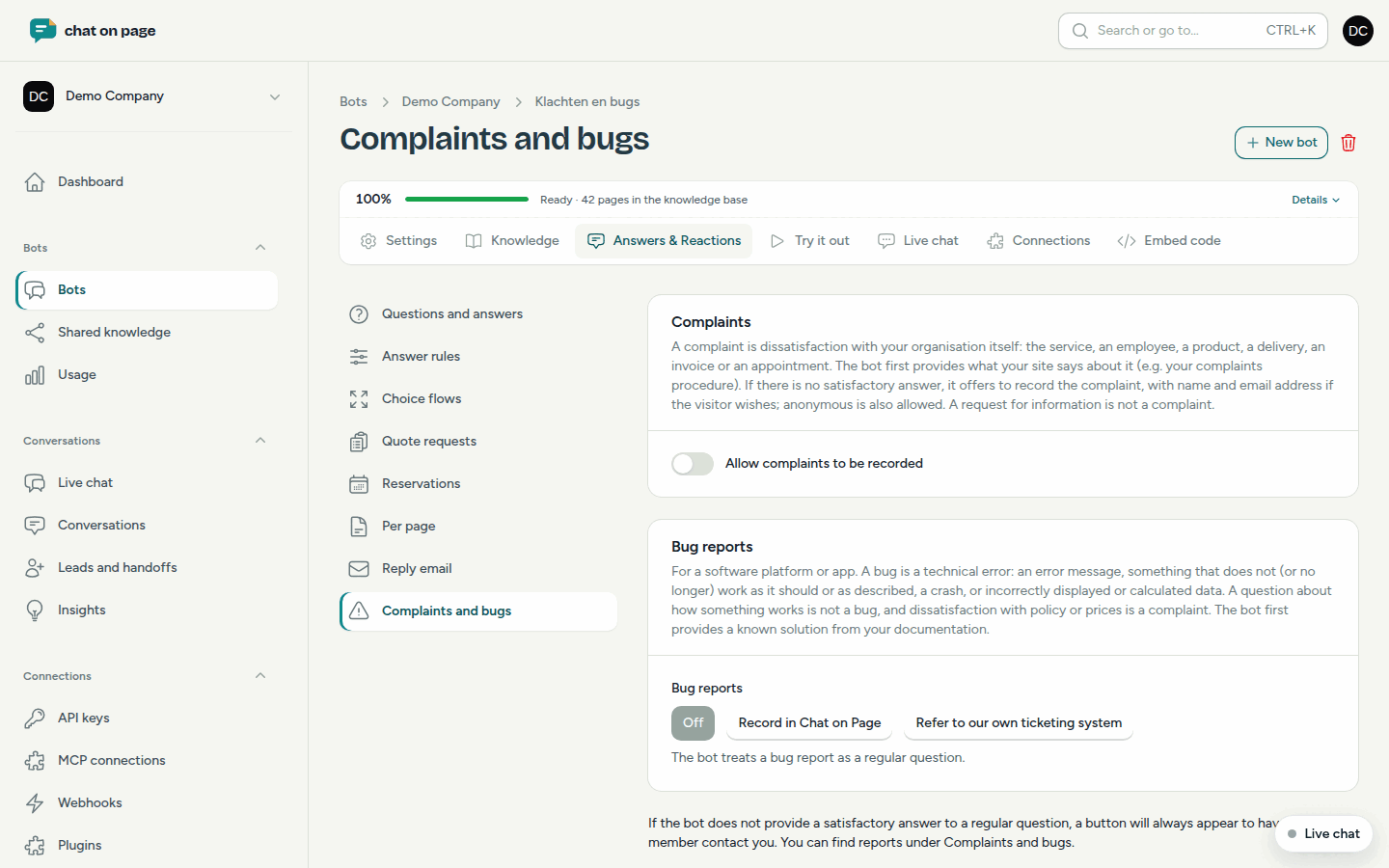
What counts as a complaint or bug?
- A complaint is dissatisfaction with your organisation itself: the service, an employee, a product, a delivery, an invoice or an appointment. A request for information is not a complaint. The visitor can provide their name and email address, but anonymous reports are also allowed.
- A bug is a technical error in your software or app: an error message, something that doesn’t work as it should, a crash or incorrect data. A question about how something works is not a bug.
Buttons under the answer
If the bot does not find a sufficient answer, it displays a button under its response:
- Have an employee contact me: always appears for a regular question without a complete answer. See Leads and handoffs.
- Record my complaint: for a complaint, if complaints are enabled.
- Report a bug: for a bug, if bug reports are enabled.
The buttons appear in the language of the conversation.
Following up on reports
All reports are listed in the main menu under Conversations > Complaints and bug reports. Each report is assigned a number (K- for a complaint, B- for a bug). You can filter by Type and Follow-up and set the status to New, In progress or Resolved. Use View to see the details and Conversation to see the full conversation.
Good to know
- The daily summary is sent in the morning.
- Team members who have the Complaints and bug reports notification enabled will receive a copy of these emails (see Profile and notifications).