
Start buttons and greeting per page
Give visitors on specific pages their own start buttons, a custom greeting and a proactive message, and tell the bot what those pages are about.
With Per page, you adjust the start of the conversation for the pages you choose. For example, on a partner page, you can show the button "How does the commission model work?". On all other pages, everything remains as it is.
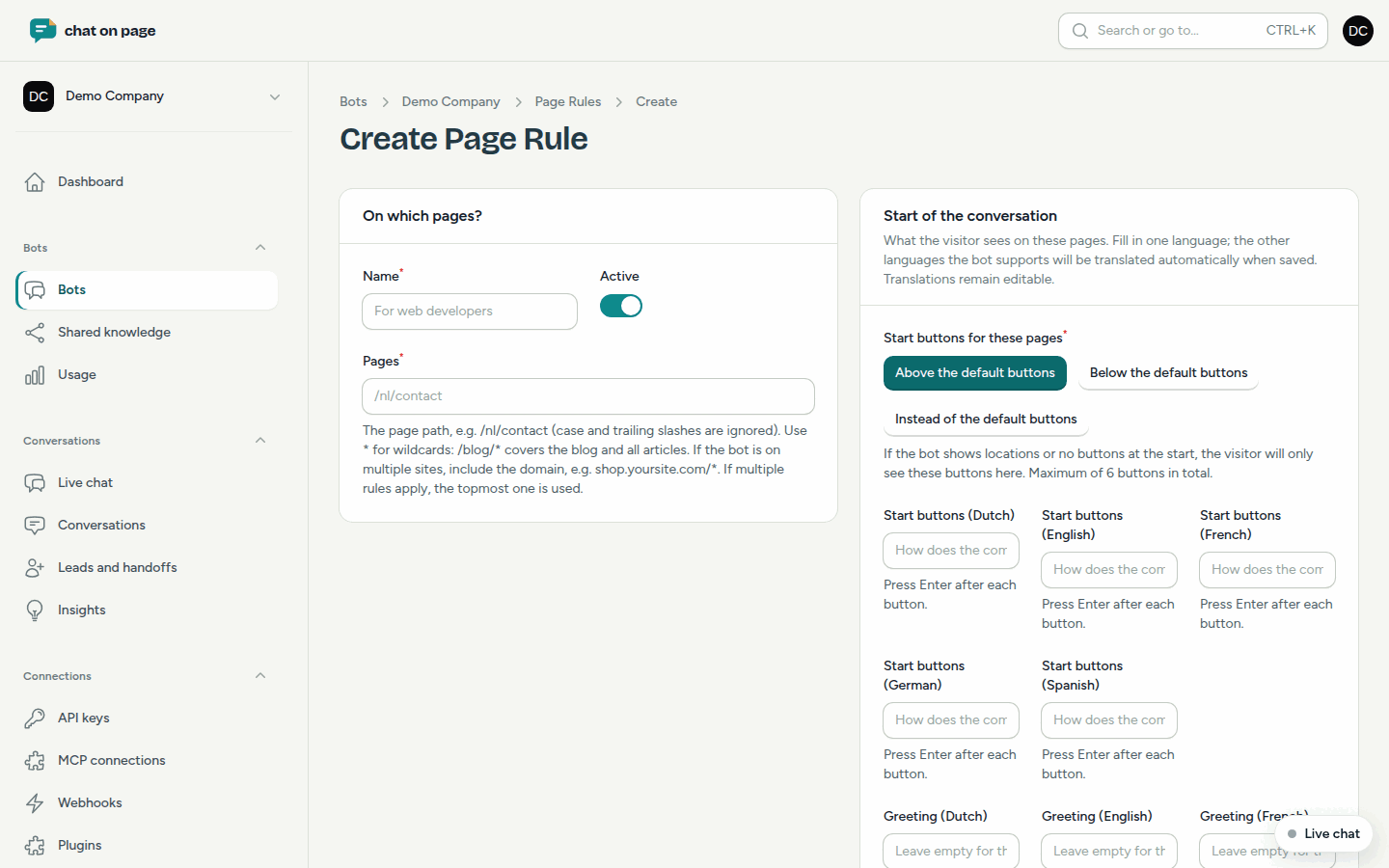
Adding a page rule
- Open your bot and select Answers & Reactions > Per page.
- Click Add page rule.
- Enter a Name and, under Pages, fill in the path, for example
\/nl\/contact. Use*to cover everything that follows:\/blog\/*covers the blog and all articles. If the bot is on multiple sites, include the domain, such asshop.yoursite.be\/*. - Under Start of the conversation, choose where the Start buttons for these pages appear: Above the default buttons, Below the default buttons, or Instead of the default buttons.
- Enter the Start buttons (press Enter after each button) and, optionally, a custom Greeting. A blank greeting will display the default one.
- Optional: Under Proactive message, enter a short text and select After how many seconds it appears.
- Optional: Under For the bot, provide an Explanation about these pages.
- Keep Active enabled and save.
You only need to fill in one language. The bot’s other languages will be automatically translated when you save. You can adjust those translations afterwards.
How it works
- The proactive message is a card next to the chat button that addresses the visitor on those pages, even if the bot does not show anything elsewhere. How often a visitor sees it follows the bot’s Proactive greeting setting (see Behaviour).
- The explanation is optional. The bot always knows which page the visitor is chatting from. With your explanation, it can better understand vague questions like "how does that work?". Its answers remain based on your sources.
- There can be a maximum of 6 start buttons in total.
Good to know
- If multiple rules apply to the same page, the topmost rule takes precedence. You can change the order by dragging the rules in the list.
- Capital letters and a trailing slash in the path are ignored.
- If the bot shows locations or no buttons at the start, the visitor will only see the buttons from the rule on those pages.
- Do you want an answer rule or choice flow to apply only on certain pages? You can set this up in the answer rule or choice flow itself.
- View the result in Try it out or on your own site.
Another question? Our assistant will help you right away.